Webshop Integration Guide
This documentation gives an overview on how to integrate with the Loyall bonus program from a webshop, booking system or other similar systems.
Example flow
This figure shows an overall intended flow on how the webshop, customer and Loyall bonus API interact with each other
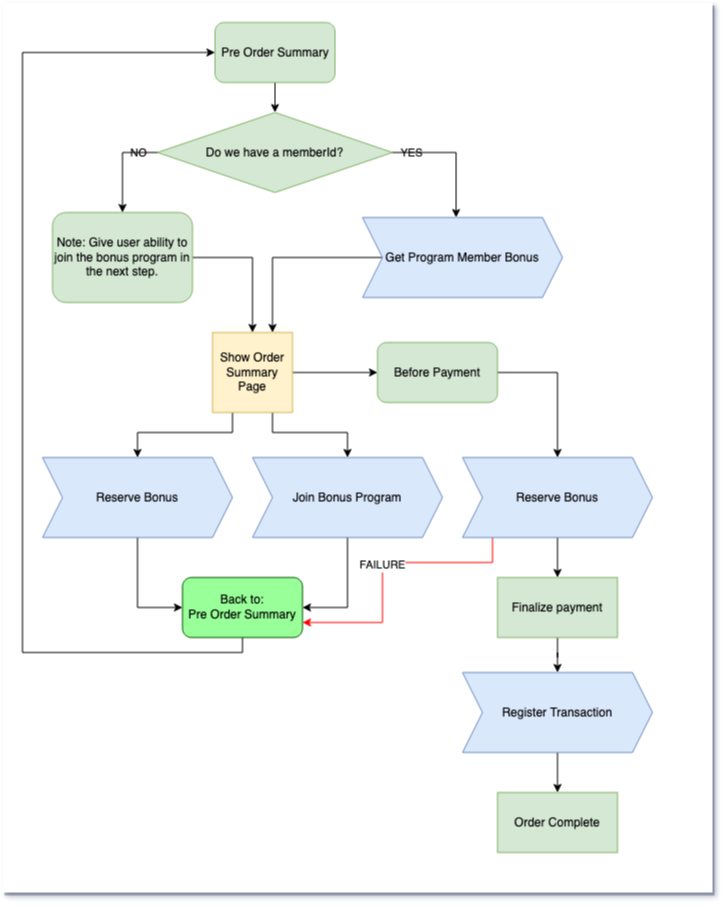
- If it's not a registered member:
- Allow registration of new member
- If it's a registered member:
- Retrieve available bonus
- Perform bonus reservation
- Register transaction
We recommend performing "Reserve Bonus" right before payment gets processed, but it can also be done manually at an earlier stage. Caching of available bonus is allowed for a limited time. If the reservation fails the cache must be invalidated.
About the API
This is a simple REST-API. All calls are done using standard HTTP-verbs like GET, POST, DELETE and PUT. Resources accept query-parameters, i.e. GET /program/{programId}/members/?phoneNumber={phoneNumber}.
Authentication
For each API call HTTP Authorization header must be provided with API-key. This will be used by the Loyall bonus API to authenticate the calling system and authorize it to perform the requested operation. The API-key will be delivered by Loyall upon registration
Headers
Authorization: Bearer {apiKey}
Webshop API Integration - Summary of API
Here's a short summary of the API-calls that are needed in the process described above. For list of all available API-calls see the API reference.
The details about each API-call is available in the API-reference.
Get Available Bonus
GetAvailableBonus will return the available bonus that a given member has available to use/be reserved.
Join Bonus Program
JoinBonusProgram is an asynchronous operation that will initiate a process to register a new member to the given bonus program. Once the registration is complete the programMemberId can be retrieved. We suggest waiting for the user with a screen, i.e. "You should now receive an SMS. Please complete your registration before continuing.".
If global member exists
User will receive a text-message to verify that he entered the correct phone number before he joins the program.
If member is new
User will receive a text-message to verify the phone number and has to complete their profile.
Create Bonus Reservation
CreateBonusReservation will create a new bonus reservation from available bonus. If there's not enough available bonus this operation will fail.
Applying the bonus is normally performed via uploading the transaction along with a reference to the reservation.
It's also possible to alter or delete the reservation using the API.
Register Transaction
RegisterTransaction will register a new transaction to the merchant. Bonus can also be applied at this time via a BonusReservation reference.
Note that it's possible to upload transactions that:
- do not belong to any known member
- do not have a
programMemberId, but do have a phone number
In the latter case the transaction may be applied to the member once he finalizes the member profile.
This operation may be performed asynchronously. If it fails it must be retried at a later time.
Return of goods
When a customer returns goods that he has purchased you should
- check that he has enough bonus available
- send this transaction in as a negative transaction
- if there is not enough available bonus either:
- stop return; customer needs to purchase more (get more bonus) before he can return the goods
- substract missing amount from return value